Stored materials are common in construction billing. A subcontractor may purchase equipment or materials well before installation, store them securely on or off site, and bill for them through a payment application.
Procore is designed to track this situation. The challenge arises when the subcontractor invoice is synced into QuickBooks.
If the integration only looks at completed work, the QuickBooks vendor bill may be lower than the invoice approved in Procore—even though the invoice appears correct in Procore.
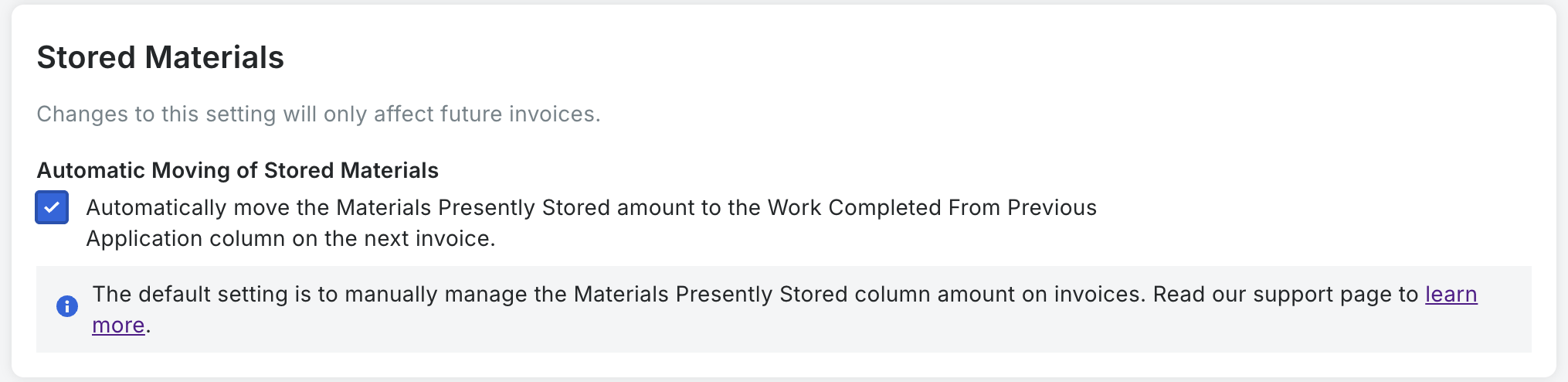
Change this Setting in Procore
On the project level:
- Navigate to Invoicing
- Click on the Gear icon to go to Invoice Settings
- Enable Automatic Moving of Stored Materials
What are stored materials?
Procore separates a subcontractor invoice into two basic categories:
- Work completed: Labor or materials already installed on the project.
- Materials stored: Materials purchased and available for the project but not yet installed.
This distinction matters operationally. Stored materials have been purchased and may be payable to the subcontractor, but they do not yet represent completed installation.
Procore supports separate billing for stored materials and can also track retainage on those amounts. Its stored-materials documentation explains how these amounts move through successive billing periods.
A simple example
Assume a subcontractor submits the following invoice:
- Work completed this period: $30,000
- New materials stored: $20,000
- Total approved in Procore: $50,000
For accounting purposes, the contractor owes the subcontractor $50,000 before retainage. The fact that $20,000 relates to stored materials does not make it any less part of the approved invoice.
But if the QuickBooks sync reads only the “Work Completed This Period” column, it creates a vendor bill for just $30,000.
That leaves:
- Accounts Payable understated by $20,000
- Project costs understated by $20,000
- The QuickBooks vendor balance $20,000 lower than Procore
- Project profitability reports temporarily overstated
In this context, “underbilling” does not mean the owner was charged too little. It means the vendor bill recorded in QuickBooks is lower than the subcontractor invoice approved in Procore.
QuickBooks uses vendor bills to track the company’s outstanding obligations. Intuit explains this workflow in its guides for entering bills in QuickBooks Online and entering bills in QuickBooks Desktop.
Why previously stored materials create an additional risk
The first risk appears when the materials are initially billed. If the sync ignores the stored-material amount, QuickBooks starts out lower than Procore.
A second risk appears in the next billing period.
After stored materials are installed, their value needs to move from the stored-material column to completed work. This is a reclassification—not a new charge. The subcontractor was already paid, or became payable, when the materials were first billed.
With Procore’s automatic rollover setting turned off, someone must manually move that value from previously stored materials to completed work.
If nobody moves it, the QuickBooks sync may continue ignoring the amount. QuickBooks remains understated.
If someone moves it in a later month, a sync that only reads current-period completed work may finally send the amount to QuickBooks—but in the wrong accounting period.
Using the earlier example:
Month one
- Completed work: $30,000
- Stored materials: $20,000
- Procore invoice: $50,000
- QuickBooks bill: $30,000
Month two
The $20,000 of materials is installed.
If it is manually moved into “Work Completed This Period,” QuickBooks may record the missing $20,000 in month two. The total eventually catches up, but the timing is wrong: Procore recognized the obligation in month one, while QuickBooks recognized it in month two.
That difference can affect month-end reporting, job-cost reports, vendor balances, cash planning, and financial review.
Does Procore’s automatic rollover setting solve the problem?
It helps, but it does not solve the entire integration problem by itself.
When the setting is enabled, Procore automatically moves the prior invoice’s stored-material balance into “Work Completed from Previous Application” on the next invoice. Procore recommends configuring this before invoices are created; more information is available in its Invoicing settings guide.
This reduces the need for someone to reclassify the amount manually.
However, if the QuickBooks integration reads only “Work Completed This Period,” it may still ignore:
- New materials stored
- Materials carried from a previous invoice
- Work completed from a previous application
- Retainage associated with stored materials
In other words, the Procore setting improves how Procore carries the information forward. It does not automatically change which fields the QuickBooks integration includes.
What should a correct sync do?
A reliable subcontractor-invoice sync should send the amount newly billed during the current period, regardless of whether it represents installed work or stored materials.
Current QuickBooks bill amount = newly completed work + newly billed stored materials − applicable retainage
When previously billed stored materials are later installed, the sync should treat that as a reclassification. It should not bill the same amount again.
The integration must therefore understand both the current invoice and prior-period values. Simply adding “Materials Presently Stored” to “Work Completed This Period” on every invoice can double-count materials carried forward from an earlier period.
inBuild is the only integration with QuickBooks to consider this when syncing.